
Troubleshooting
Clash Verge Error Reference
Bookmark this page. Left column: what you see. Right column: why, and the fix — with the detailed guide linked when the topic deserves one.
Startup and interface
| Symptom / error | Cause and fix |
|---|---|
| Blank / white window | WebView2 runtime missing or broken. Install the Evergreen runtime or use the fixed_webview2 installer — Windows guide |
| SmartScreen "Windows protected your PC" | Normal for unsigned open-source builds: More info → Run anyway. Valid only for official downloads — verify the source |
| macOS "damaged, can't be opened" | Gatekeeper quarantine flag; remove with xattr — macOS guide |
| Doesn't start with the system | Startup entry disabled by the OS or a security suite — autostart guide |
Core and config
| Symptom / error | Cause and fix |
|---|---|
Port xxxx is already in use | Another process owns the port — port conflicts |
yaml: unmarshal errors / profile won't load | YAML syntax error, usually Merge indentation — extend config |
unsupported proxy type | Core too old for a new protocol — switch/upgrade core |
rule-provider ... initial error | Rule set fetch failed or wrong behavior type — rule providers |
| Core crash-looping | Switch to the stable core first; if it persists, empty Merge/Script and bisect |
Network features
| Symptom / error | Cause and fix |
|---|---|
| TUN switch grey / errors on enable | Service mode missing or broken — service fix |
| Subscription 401/403/timeout | Expired token or blocked domain — subscription guide |
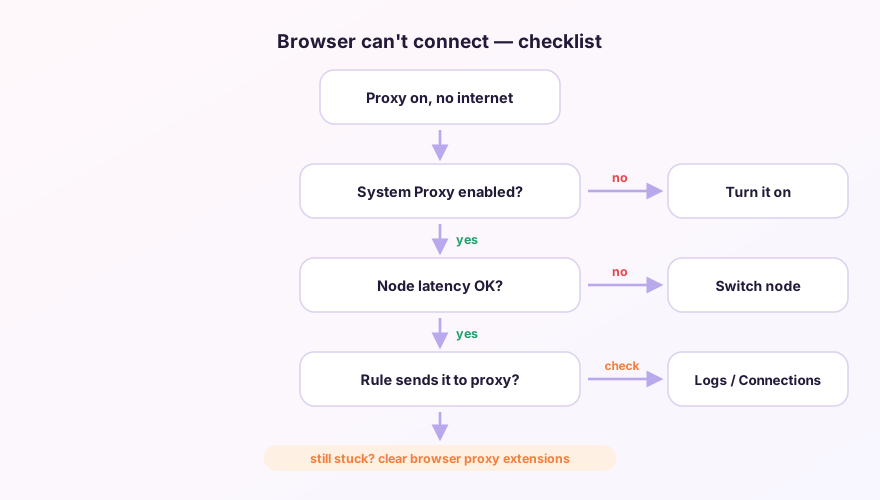
| Proxy on, nothing loads | Five-step diagnosis — full checklist |
| Store (UWP) apps offline | Loopback restriction — UWP exemption |
Tip
Error not listed? Copy the raw message from the Logs page into the GitHub repo's issue search — odds are someone already solved it.
Don't have Clash Verge yet?
Download v2.5.7Windows 64-bit installer · v2.5.7 · free & open source