
Troubleshooting
Proxy On but the Browser Won't Load: Full Checklist
"Latency tests are all green but nothing loads" — the classic help-forum title. Work through these five steps; each has an unambiguous verdict, so no guessing required.
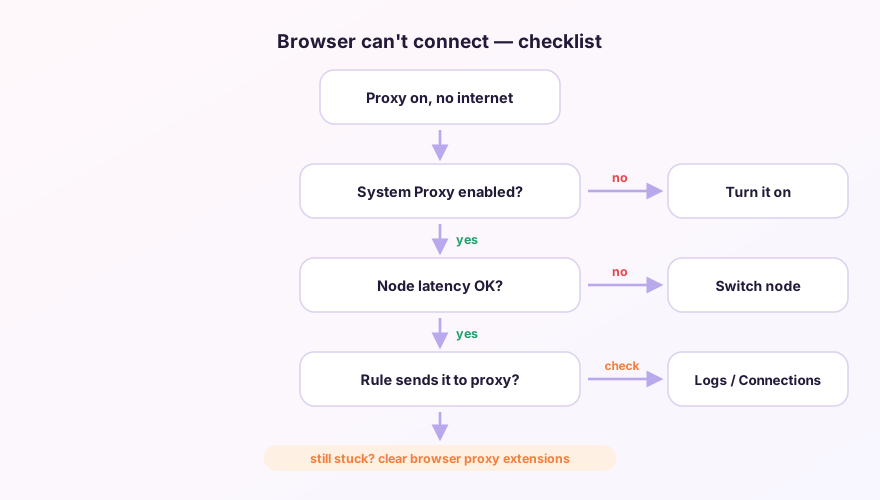
Step 1: Is the system proxy actually set?
Check the toggle in Verge's Settings, then verify the OS agrees: Windows Settings → Network → Proxy should show 127.0.0.1:7897. Toggle on but nothing written? Flip it off/on once; if it still won't stick, something else (another proxy tool, corporate policy) is fighting for the setting.
Step 2: Does the browser have its own ideas?
Browser proxy extensions (SwitchyOmega, VPN add-ons) outrank the system proxy. ERR_PROXY_CONNECTION_FAILED pointing at a port that isn't 7897 = an extension aiming at a stale address. Disable all proxy-type extensions, or set the extension to "system proxy" mode. If a private window (extensions off by default) loads fine, the verdict is in.
Step 3: Is the node genuinely usable?
A green latency check means the probe URL got through — not that real sites will. Try two or three nodes in different regions; or flip to Global mode briefly to take rules out of the equation. If Global + multiple nodes all fail, the problem is the subscription or the provider.
Step 4: Did a rule route it to DIRECT?
When only certain sites fail, find their domains on the Connections page and see whether they went DIRECT or through a group. Misclassified by something like GEOIP,CN? Prepend a corrective rule in Merge, or update the Geo data.
Step 5: DNS
Pages hanging at "Resolving host…", or only some domains failing, points at DNS: make sure no public DNS is hard-coded on the adapter, and that TUN's DNS hijack wasn't disabled — details in the DNS guide.
After every change, clear existing connections on the Connections page before retesting — established connections keep their old path and will happily mislead you.
Windows 64-bit installer · v2.5.7 · free & open source