
Advanced
Gaming Through the Proxy: Steam Downloads and Online Play
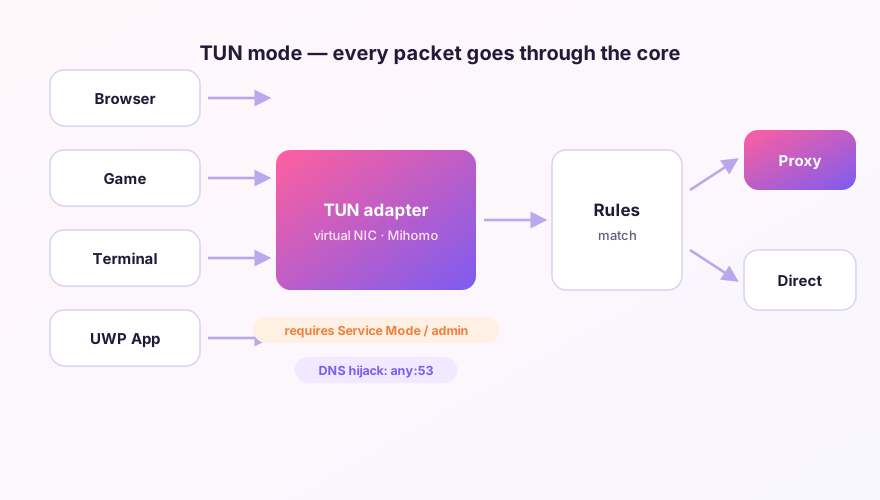
The short answer first: getting games through a proxy practically requires TUN mode. Game clients never read system proxy settings; they open raw TCP/UDP connections. Here's the setup — and the cases where you shouldn't bother.
Base setup
- Enable TUN per the TUN guide (service mode included);
- Confirm your nodes pass UDP: online play is UDP-heavy. Look for a udp flag in node details on the Proxies page, or ask your provider. No UDP = guaranteed rubber-banding;
- In Rule mode, add game-specific routing: send game domains/IPs to a low-latency group, leave the rest untouched.
Example: Steam split-routing
Prepend two rules in the Merge config:
prepend-rules:
  # Steam download CDNs often have local mirrors - keep direct
  - GEOSITE,steam@cn,DIRECT
  - GEOSITE,steam,Game Nodes
Steam's download CDN frequently has in-country mirrors that outrun any proxy, while the store, community and friends services are what actually need proxying. Split-routing beats全局 mode here — download speed and reachability at once.
Latency tuning for online play
- Build a dedicated url-test group holding only low-latency, UDP-capable nodes;
- Respect geography: JP servers want JP nodes, US-West servers want US-West nodes — no proxy beats the speed of light;
- Watch the Connections page to confirm the game's traffic actually uses the intended group.
Competitive shooters care about jitter as much as latency, and shared provider bandwidth gets rough at peak hours. Dedicated game accelerators (private routes, smart routing) usually do better for ranked play. Proxies shine at download acceleration and reaching cross-region servers at all.
Windows 64-bit installer · v2.5.7 · free & open source