
Core features
Proxy Group Types: url-test, fallback and load-balance
Those "Auto" and "Failover" groups on your Proxies page aren't decoration — each type implements a different selection strategy. Understand them and you can build groups that fit how you actually use the network.
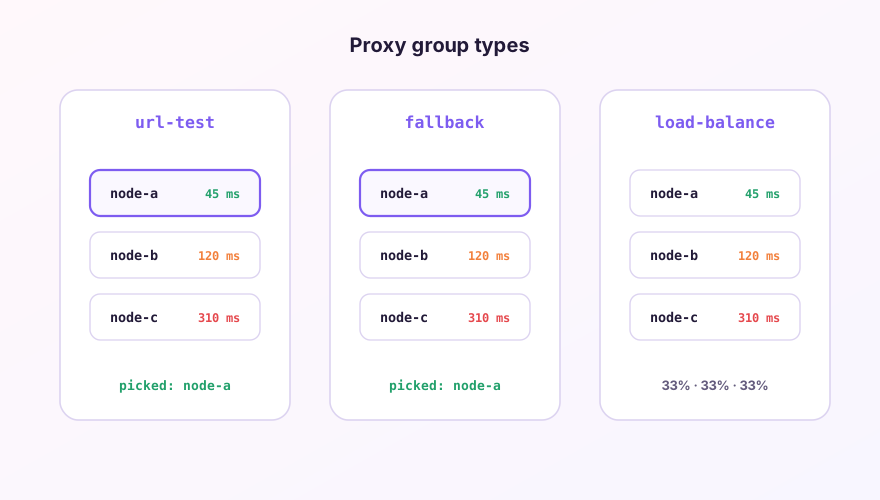
The four common types
- select — fully manual; whatever you click is what's used. Good as the outer layer you control by hand;
- url-test — periodically measures latency across members and always uses the fastest. Maximum speed, but nodes can switch often, which occasionally logs you out of sites that pin sessions to IPs;
- fallback — walks the member list in order and uses the first alive node. Perfect for "main node + backups" where list order is priority;
- load-balance — spreads connections across members. Useful when a single node's bandwidth is the bottleneck; same session-stickiness caveat, rarely needed day-to-day.
Writing your own url-test group
Add to the Merge section of the global extend config:
proxy-groups:
  - name: "HK Auto"
    type: url-test
    include-all: true
    filter: "(?i)hk|hong ?kong"
    url: "http://cp.cloudflare.com/generate_204"
    interval: 300
    tolerance: 50
filter selects Hong Kong nodes from all proxies with a regex; tolerance: 50 means a new node must beat the current one by 50ms before switching — kills the ping-pong effect.
Groups inside groups
Provider configs commonly nest: an outer select group ("Node Choice") containing url-test subgroups ("HK Auto", "JP Auto"). You choose the region; the subgroup keeps picking the fastest node within it. Control and speed at the same time.
url-test probes travel through each node and cost real traffic. A 60-second interval burns quota for nothing — 300 seconds is fine. More on probe URLs in the latency guide.
Windows 64-bit installer · v2.5.7 · free & open source