
Setup
Migrating from Clash for Windows to Clash Verge
Clash for Windows (CFW) was deleted by its author in November 2023 and hasn't seen a security update since — and its bundled Clash Premium core is frozen in time. If you're still on it, Clash Verge Rev is the smoothest way out: the same YAML config format, a modern Mihomo core, and native TUN support that CFW never had.
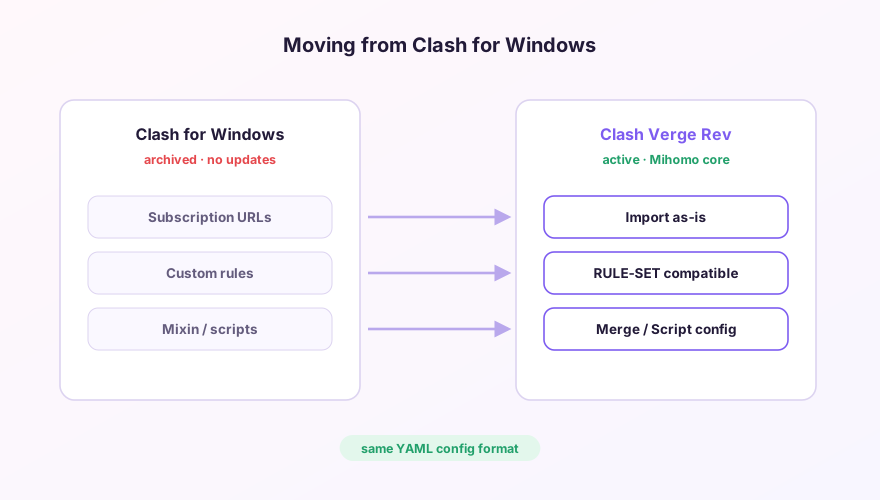
Migration map
| In CFW | In Clash Verge |
|---|---|
| Profile subscription URLs | Re-import on the Profiles page — identical links work |
| Rules / rule-providers | Fully compatible; Mihomo speaks every Clash rule type |
| Mixin | Profiles page → Global Extend Config (Merge), nearly identical syntax |
| JavaScript parsers | The Script half of the extend config; small API differences to adjust |
| TUN (manual wintun fiddling) | Built in — one toggle, see the TUN guide |
| UWP Loopback tool | Also built in, see UWP loopback |
Suggested order
- Install Clash Verge, but don't uninstall CFW yet;
- Import each subscription into Verge and confirm nodes test green;
- Copy your Mixin content (custom DNS, fake-ip whitelist, etc.) into Verge's Merge config — syntax details in the extend config guide;
- Run both for a few days, then disable CFW's autostart and uninstall it.
Tip
Default ports differ: CFW used 7890, Verge uses 7897. If some tool has 127.0.0.1:7890 hard-coded, just change Verge's mixed port back to 7890 under Settings → Ports — see port configuration.
Don't have Clash Verge yet?
Download v2.5.7Windows 64-bit installer · v2.5.7 · free & open source