
Setup
Three Ways to Import a Subscription
Got a subscription link from your provider? There are three ways to load it into Clash Verge, ordered here from the everyday method to the rare one.
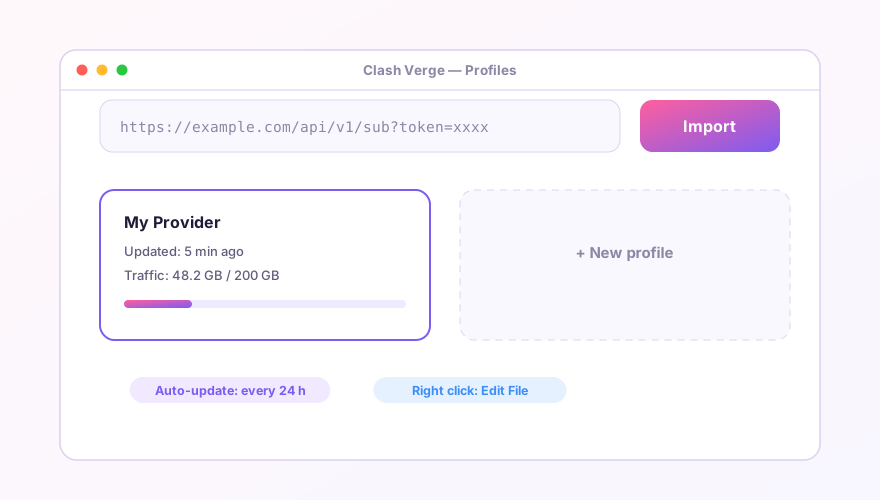
Method 1: Paste the URL (99% of cases)
- Copy the subscription URL from your provider's dashboard (usually an
https://link with a token parameter); - Open the Profiles page in Clash Verge and paste it into the input at the top;
- Click Import. A card appears showing traffic usage and expiry (if your provider reports them);
- Click the card to select it, then head to the Proxies page — your nodes are there.
Method 2: Local file
For self-hosted servers or a YAML file someone handed you. On the Profiles page choose New, set the type to Local, then paste the content or pick the file. It must be Clash-format YAML (with a proxies key) — raw V2Ray JSON won't load.
Method 3: Convert the format first
If your provider only offers V2Ray/SS-style subscriptions and the import fails to parse, it needs converting to Clash format. Check the provider dashboard first — most have a "Clash" button hiding somewhere. If not, run your own sub-web converter. Avoid random public converter sites: pasting your subscription there hands your nodes to a stranger.
After importing
- The three-dot menu on a card → Update refreshes nodes manually;
- Edit Info lets you set an auto-update interval — 1440 minutes (daily) is plenty;
- Switching providers? Keep both cards and click between them; no need to delete anything.
If import fails, read the error: 401/403 means the link expired or your quota ran out — reset it in the provider dashboard. Timeouts usually mean the subscription domain itself is blocked; see fixing subscription updates.
Windows 64-bit installer · v2.5.7 · free & open source