
Core features
DNS and Leak Protection: How fake-ip Works
DNS is the most overlooked link in a proxy chain: your traffic rides an encrypted tunnel while the domain lookups travel in plain text to your local ISP — that's a DNS leak, and it reveals every site you visit. Clash Verge's defaults already defend against this; here's how the machinery works and which knobs not to touch.
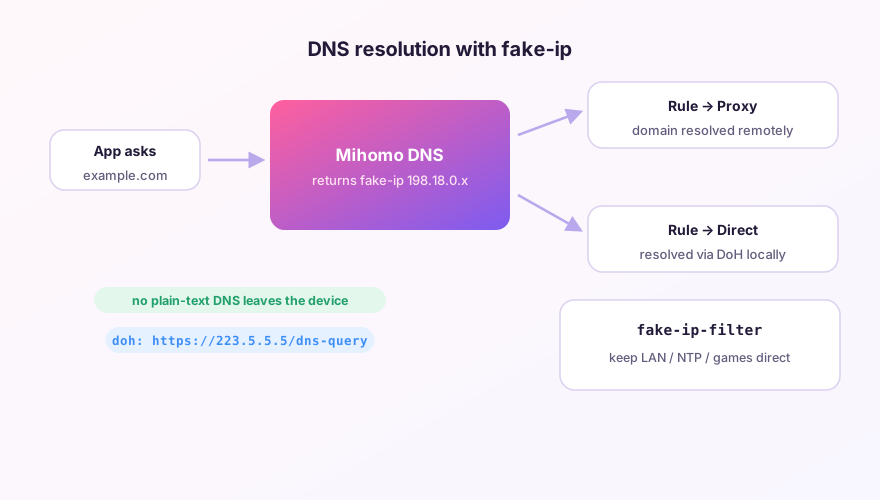
fake-ip: the default, and the right one
When an app asks for a domain, the core doesn't resolve it at all — it instantly returns a placeholder address from the 198.18.0.0/16 reserved range. The app connects to that fake IP, the core maps it back to the domain, and routes by rule. For proxied domains, the domain itself is sent to the node and resolved remotely. Local resolution of proxied domains never happens, so there is nothing to leak.
Bonus: skipping the wait for real resolution makes connections start faster.
SponsoredWhere does the subscription link come from?Our partner provider gives you 1 GB of high-speed Hong Kong data at signup — import it in one click.Get high-speed nodesredir-host: the compatibility fallback
The core resolves domains for real and returns actual IPs. Slightly better compatibility (a few programs dislike fake addresses), but resolution happens locally, so you additionally need encrypted DNS to avoid leaks. Unless something concretely breaks under fake-ip, there's no reason to switch.
fake-ip-filter: domains that need real IPs
Some names must resolve truthfully — LAN devices, NTP time sync, some game launchers. The default config ships a sensible whitelist; extend it in the Merge config:
dns:
  fake-ip-filter:
    - "*.lan"
    - "+.ntp.org"
    - "+.stun.*.*"
    - "+.mynas.example.com"
Testing for leaks
With the proxy on, run the Standard Test at dnsleaktest.com. Seeing only DNS servers in your node's region = clean. Seeing your local ISP's servers = leaking — check whether you switched to redir-host, or turned off DNS hijack in TUN settings.
Don't "optimize" by hard-coding public DNS (8.8.8.8 etc.) on your network adapter. That routes queries around the core entirely and manufactures the very leak you're trying to avoid. Let the core own DNS.
Windows 64-bit installer · v2.5.7 · free & open source