
Core features
Global Hotkeys: Toggle the Proxy Without the Window
If you flip between "proxy on for work" and "proxy off for gaming" eight times a day, digging through the tray menu each time adds up. Clash Verge supports global hotkeys — press the combo anywhere and it fires.
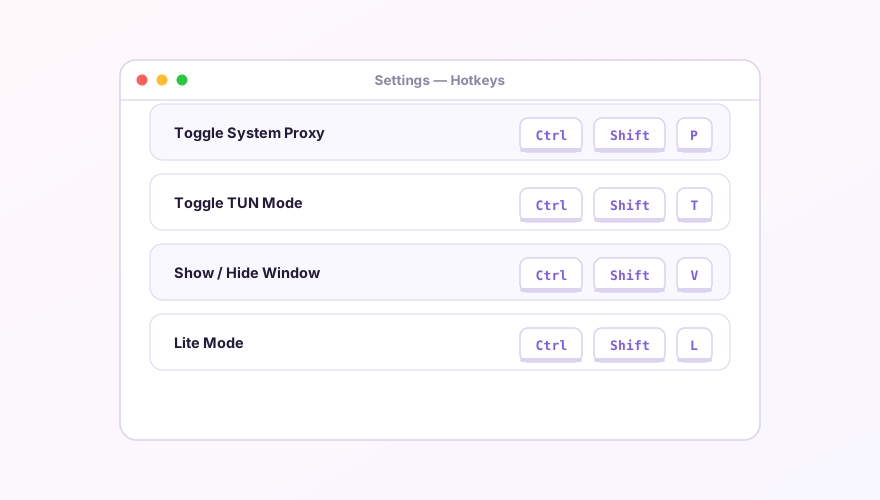
Setting them up
- Open Settings → Hotkey Settings;
- Each row is an action — click the input and press the combination you want;
- Available actions include: toggle System Proxy, toggle TUN mode, show/hide the main window, toggle Lite Mode.
A scheme that works
| Action | Suggested keys | Why |
|---|---|---|
| Toggle System Proxy | Ctrl+Shift+P | P for Proxy, easy to remember |
| Toggle TUN Mode | Ctrl+Shift+T | Careful: browsers use this for "reopen closed tab" — pick Alt+T if that clashes with your habits |
| Show/Hide Window | Ctrl+Shift+V | V for Verge |
Conflicts and caveats
- Global hotkeys are system-wide and will steal the combo from other apps. If registration fails, another program owns it — pick a different combo;
- At least one modifier (Ctrl/Alt/Shift) is required; bare keys won't register, by design;
- There's no popup confirmation when a hotkey fires — the tray icon changes state, so glance there if unsure.
Tip
Hotkeys plus silent start is the efficiency combo: Verge stays invisible from boot, and two keystrokes control everything.
Don't have Clash Verge yet?
Download v2.5.7Windows 64-bit installer · v2.5.7 · free & open source